
User Settings
Principals
PhotoPosition
History
Help, P3
<== Help ==>
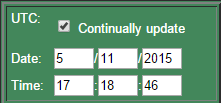 |
Un/tick 'Continually update' to freeze the current screen. | The application is designed to show the current position, but this isn't always applicable if planning an obervation in future. |
| Select specific date & time. | The application always uses UTC (Zulu or Greenwich Mena Time). Make sure 'Continually update' is disabled before selecting a specific time. | |
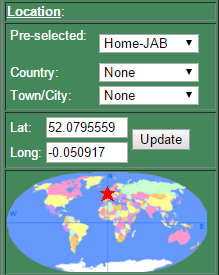 |
Select your location by:
|
Once set the location is roughly marked by the red star. For convenience particular locations that are of interest to the author have been pre-selected. To provide a reasonable spread of locations across the World a database of 'Administrative' towns was downloaded from a Gazeteer website and supplemented with the County towns of U.K. and the State capitals of USA. It was noted there were many duplicates, positions were inaccurate and many names were somewhat eroneous. Having spent many hours manually correcting these using Google Maps and Google Earth the author takes no responsibility for any remaining errors. This has provided c. 3,350 towns across the World, but sparsely populated areas such as Australia and Canada have reatively few references, whereas others such as Malta, Azerbaijan and Slovenia appear to list virtually every large town. There are also only c. 390 and 830 listings for the Southern and Western hemispheres. The most accurate mthod is to manually enter your Latitude and Longitude. The map method, although convenient is only accurate to c. 2° due to its small scale. |
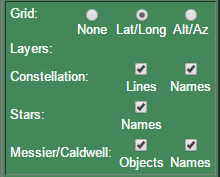 |
Select the grid to display. | Grids are shown in fine dark green on the main sky 'globe'. (The author has recently noted some Lat/Long lines are missing or truncated when +/- large Longitudes are selected. As this is purely cosmetic and other priorities persist (this is why I retired recently!) these will not be corrected in the foreseeable future. Any corrections would be welcomed!) |
| Select the details to display on the main 'globe'. |
The main view gets a little cluttered if everything is displayed. These options allow the users to select what is important to them. | |
 |
'Refresh changes'. | Most settings will automatically update when the changes are made, but the following need the button to be pressed before the changes are made: specific date & times; displayed detail 'layers'. |