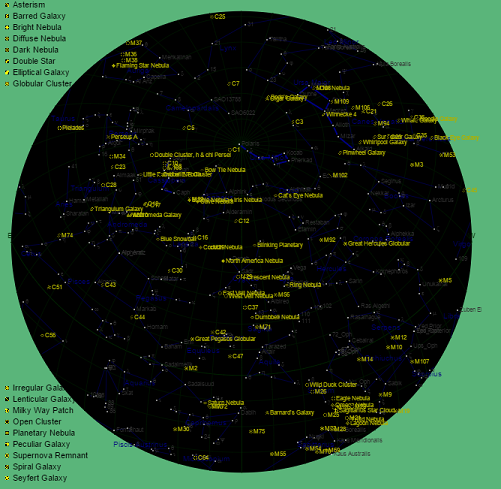
Astronomy - MC Tracker, Main Screen Layout
MCTracker Help
Primary 'Globe' Explained
Application
Principals
PhotoPosition
Equipment
History
Help, P2
<==         Help       ==>

The 'globe' is the main output for the application, with the object list derived from it.

The display shows all stars in the hemisphere above the selected location. The projection used is opposite to a traditional map, which looks down from the sky with North (usually) at the top. This view is similar to lying on the ground with your head Northward and looking upwards, so East & West are transposed.

As the display is expected to be used in real-time (via a tablet) it will update the view every 4 minutes (equivalent to 1º rotation of the Earth), unless 'continual update' is de-selected.

Depending on the layers selected in the user settings, the globe will display:
  • A background grid of:
    • Latitude/longitude where the longitudinal lines show the transit of the stars as the Earth rotates, moving from left to right.
    • Altitude/azimuth which assists in locating an object in the sky.
  • The brightest stars that form the constellations.
  • Constellation lines (in blue).
  • Constellation names (in blue).
  • Messier & Caldwell objects, shown by their own icon (in yellow).
  • Messier or Caldwell names (in yellow).
A key is provided on the left of the screen showing the object's type.
Right-mouse-clicks have the following results:
  • On a globe white star - will bring up details of its' constellation.
  • On a globe yellow icon - will bring up specific details on the associated Messier/Caldwell object.
  • On a key icon - will bring up details of the type of object.
  • Elsewhere on the globe (blank area or grid) - will re-arrange the objects in the order closest to the point. (A 'continual update' will revert to the normal order).